
Start/Stop Log
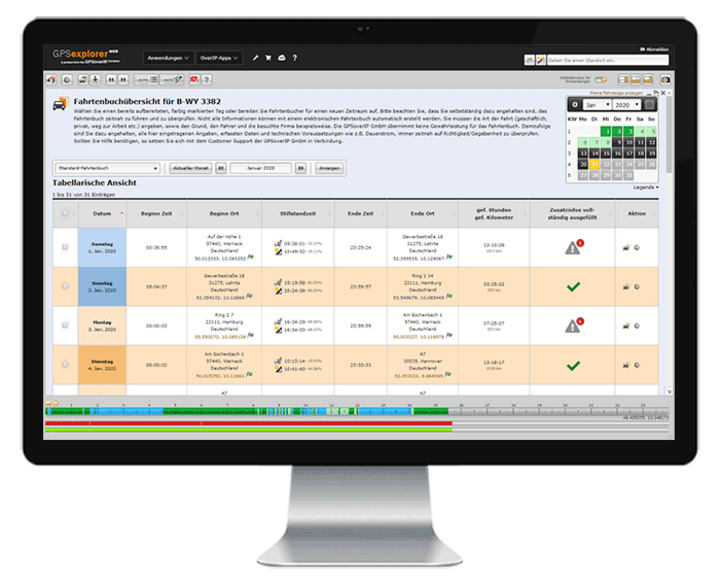
The GPSoverIP Telematics Start-Stop Log automatically records every trip when the vehicle starts and stops. The starting point, destination, date, and route are precisely tracked via GPS and automatically assigned to recurring locations. Post-processing is reduced to just a few clicks.
This allows you to quickly generate complete trip reports for both personal and business trips—without any manual effort.
This saves time, ensures clear documentation, and reduces unnecessary administrative work. Auto-complete automatically fills in recurring entries.
Tip: The GPSauge is tax-deductible.
Start-Stop Log in GPS Explorer – Automatic Trip Logs from Telematics
The Start/Stop Log in GPS-Explorer generates comprehensive trip summaries based on the telematics data from your GPSauge. Each trip is recorded at the start and end, including distance, time, and location. Recurring destinations are automatically assigned, so only minimal follow-up work is required.
Important for existing customers:
The former “Electronic Trip Log” in GPS-Explorer is now called the Automatic Trip Log. The range of features remains the same, and the operation is unchanged.
For a tax-compliant electronic logbook, the “Digital Logbook jammer.net” solution is also available. This solution is based on a logbook app combined with an OBD logbook connector and its own browser-based web portal.

Automatic Trip Logging via GPS
The Start/Stop Log uses the GPS data from the GPSauge telematics device and automatically detects every trip:
- Automatic start/stop detection: Trips are recorded when you start and stop driving, without any manual input.
- Precise data for each trip: The starting point, destination, date, time, and distance traveled are documented in detail.
- Auto-complete for known destinations: Recurring locations (e.g., depot, regular customers, airport) are automatically recognized and assigned stored names.
- Minimal post-processing effort: Instead of handwritten lists or Excel spreadsheets, a quick review in the portal is all it takes to check trips and add any missing information if necessary.
This provides a complete overview of the actual routes driven with very little time investment, which can be used for internal records, billing, and analyses.
The former “Electronic Logbook” in GPS-Explorer is now called the Automatic Trip Log. The range of functions remains the same, and the operation is unchanged.
For a tax-compliant electronic logbook, the “Digital Logbook jammer.net” solution is also available. This solution is based on a logbook app combined with an OBD logbook connector and its own browser-based web portal.
Logbook / Trip Reports in GPS Explorer
GPS-Explorer generates not only simple lists from the automatically detected start and stop points, but also analyzable logs and reports:
- Detailed trip logs by vehicle and time period
- Weekly and daily operation reports with all trips and assignments
- Annual overviews that can be generated in just a few minutes
Depending on the installed hardware, additional vehicle metrics can also be displayed, such as:
- Engine runtime
- Fuel level / fuel volume
- Door contacts (door open / door closed)
- Additional telemetry data from the vehicle’s systems
Depending on the hardware used, additional vehicle data may be displayed. This includes, for example, engine runtime, fuel levels, and tank levels, or information from door contacts. Combined with location data, this results in clear and traceable mission documentation that goes far beyond a simple list of start and destination points.
Typical Use Cases
Many taxi and rental car companies have been using the start-stop log for years. They must be able to document which trip was made at what time and with which vehicle.
At the same time, the log provides greater transparency within the fleet. Dispatchers and management can see which vehicles are being utilized to what extent and which routes are driven particularly frequently. The data can be used as a basis for billing and internal auditing. Data exports can be integrated with other systems, such as taximeter readings, expense reports, or dispatch software.
- Proof for clients: Which trips were made, when, and with which vehicle?
- Transparency in the fleet: Which vehicles are in use and to what extent, and which routes are typically driven?
- Basis for billing & internal control: Trips can be easily exported and linked to other systems (taximeter data, expense reports, dispatch).
Automatic trip logs are
also useful outside the taxi industry, including for:
- Service and trade businesses (documentation of customer visits)
- Municipal fleets (evidence of vehicle and equipment usage)
- Delivery and courier services (overview of routes and trips)

Your Benefits
- Automatic Start/Stop Detection
- Precise GPS Logging
- Autocomplete for Common Destinations
- Quick Post-Processing on the Portal
- Less effort compared to manual documentation
- Suitable for all types of vehicles
- u. v. m.
Start-Stop Logbook vs. Digital Logbook jammer.net
The Start-Stop Log in GPS-Explorer and the digital trip log jammer.net complement each other but serve different purposes.
The Start-Stop Log in GPS-Explorer focuses on trip history and mission reports. It is particularly well-suited for fleet analysis, mission documentation, and providing evidence to customers. The data is based on GPS and telemetry data from the GPSauge. It is accessed directly through the browser-based GPS-Explorer web portal.
The jammer.net digital logbook is designed as a logbook app with its own browser-based web portal. The focus is on tax-compliant logbook record-keeping, particularly for company car drivers, self-employed individuals, and businesses with company vehicles used for personal purposes. Trips are recorded using an OBD logbook connector in conjunction with the logbook app. In the jammer.net web portal, trips can be classified, documented, and prepared for export to a tax advisor or financial accounting department.
For a tax-compliant electronic logbook, jammer.net is the right solution. The automatic trip log in GPS Explorer also provides trip logs and mission reports from GPSauge Telematics. This combination meets both the requirements for fleet analysis and for maintaining an accurate logbook for tax purposes.

The associated telematics portal
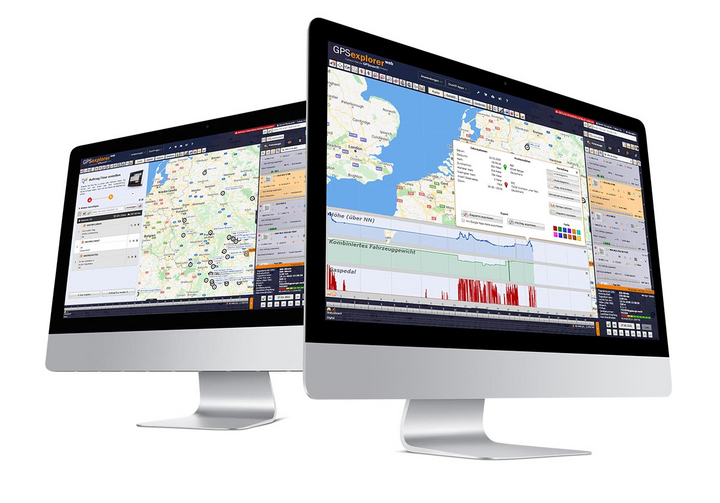
The GPS Explorer (browser-based web portal) is included with every GPSaugen (telematics unit). It is a powerful application for managing fleets of any size.
It doesn’t matter whether you need to manage just one vehicle or thousands.
Try it now with no obligation

Test the most professional telematics solution extensively, with no obligation and at no cost, and see for yourself why it’s the most powerful telematics system.
Simply provide your contact information, and your account manager will assist you from product selection to installation in your vehicle—he’ll take care of everything and be available to answer any questions you may have throughout the entire trial period.
- Free Trial
- based on your requirements
- tailored to your company’s structure
- Your personal account manager will guide you through the process
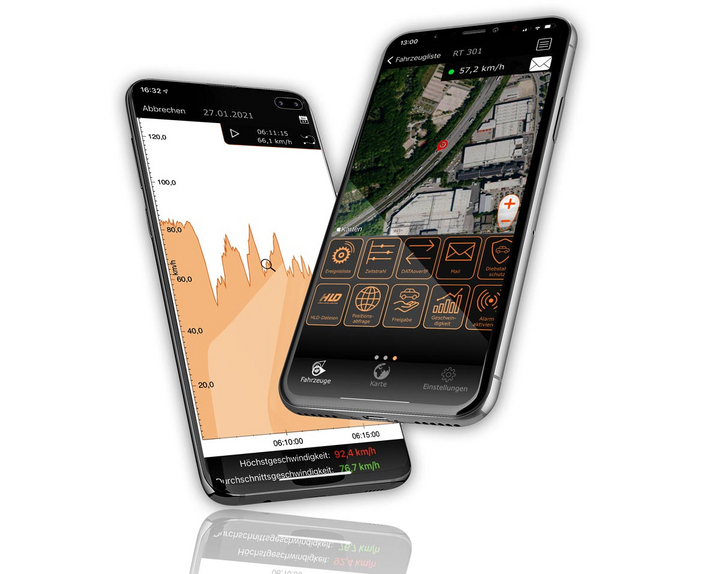

Everything at a glance—even on the go
Manage your fleet with GPS-Explorer Mobile: fleet management even when you're on the go.
Which vehicle in your fleet is closest to a destination address?
Where are my vehicles?
What is the current temperature in the cargo area?